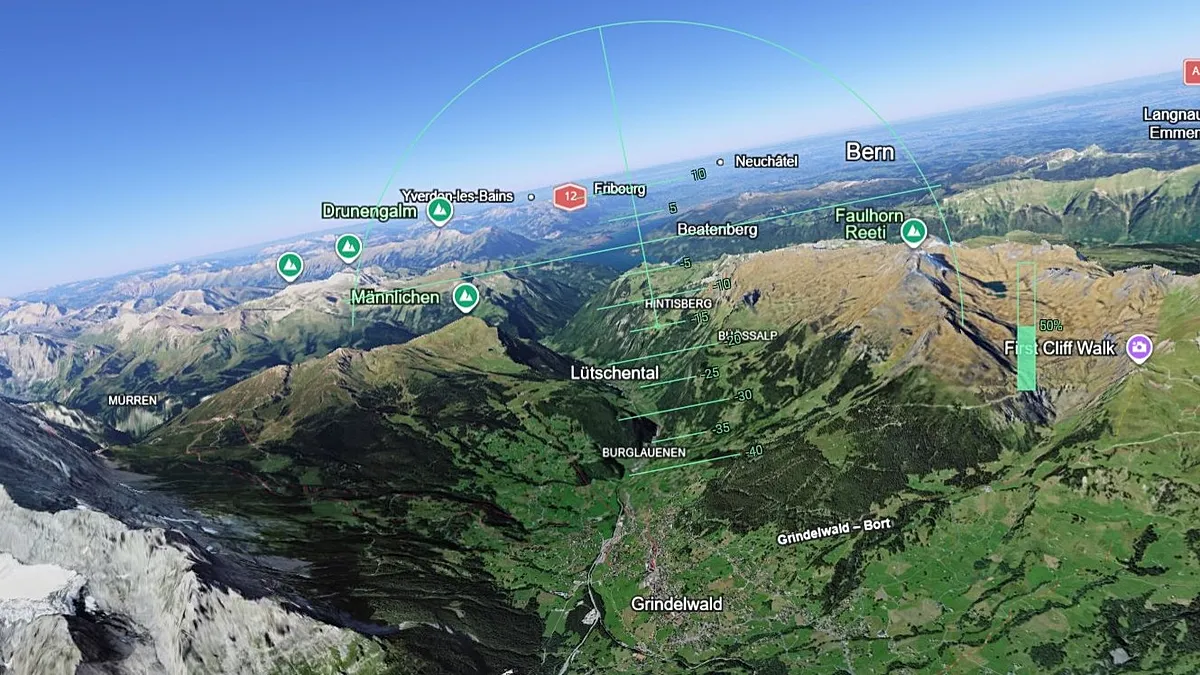
Fly around the globe with Google Earth’s new flight simulator
Fly around the globe with Google – For many of us, the dream of soaring through the skies has never faded. Even as careers and passions have shifted, the childhood fantasy of being a pilot persists. Whether it’s the thrill of maneuvering through clouds or the sheer joy of exploring the world from above, this new feature from Google Earth brings that dream closer than ever. Launched on June 12, the latest addition to the platform is a flight simulator designed to let users take to the skies with ease, offering an immersive experience that blends technology with imagination.
Exploring the World from a New Perspective
Google Earth’s flight simulator is more than just a game—it’s a tool that transforms the way we interact with digital maps. Unlike traditional navigation, this feature allows users to imagine themselves as pilots, guiding their virtual aircraft across continents, oceans, and even the polar regions. The simulator is tailored for everyday users, not professional aviators, and it prioritizes accessibility and simplicity. With a few clicks, anyone can take off and land, navigating through stunning 3D landscapes and high-resolution imagery that brings the planet to life in unprecedented detail.
One of the standout features is the ability to see the world as it truly is—down to the texture of rooftops and the shimmer of water bodies. Users can zoom in on cities, chart flight paths over mountain ranges, or even witness the curvature of the Earth as they fly at high altitudes. The tool is especially praised for its intuitive interface, which makes it easy for newcomers to grasp. Unlike complex aviation software, this simulator focuses on fun and exploration, letting users experiment with flight maneuvers without the pressure of real-world consequences.
From Desktop to Browser: A New Era of Accessibility
Google Earth has previously included a flight simulator as part of its professional desktop application, but this new version marks a significant step forward by making it available directly in the browser. The shift to web-based access means users no longer need to download software or install additional tools. Simply visiting earth.google.com and selecting the Explore Earth option leads to the simulator, which is seamlessly integrated into the platform’s existing features. This move reflects Google’s commitment to making its tools more user-friendly and widely available, bridging the gap between casual exploration and advanced navigation.
While the professional app offered robust capabilities, the browser-based version is more approachable. It streamlines the experience, focusing on core functionalities that cater to a broader audience. Users can adjust their speed, tilt their view, or control the aircraft’s orientation with simple commands. The flight experience is not limited to static maps—it’s dynamic, allowing for real-time interaction that mimics the feel of actual flying. Whether you’re a casual enthusiast or someone curious about aviation, this simulator offers a unique blend of education and entertainment.
Keyboard Shortcuts and Customization
For those who want to dive deeper into the simulator’s capabilities, Google has made a range of keyboard shortcuts available on the Developers’ page. These shortcuts enable users to fine-tune their flight experience, from accelerating and decelerating to executing precise turns and rolls. The guide also covers how to control the aircraft’s altitude and direction, providing a level of customization that enhances the realism of the journey. While mastering these commands may take time, they open the door to more advanced play, allowing users to create their own flight paths and explore the globe in ways that were previously unimaginable.
Interestingly, the flight simulator includes a variety of flight modes, including a “tour” option that automatically takes users through pre-programmed routes. This feature is ideal for those who want to experience iconic landmarks like the Grand Canyon or the Himalayas without worrying about navigation. However, for the more adventurous, there’s also a “free flight” mode, which grants full control over the aircraft. This duality ensures that the tool remains versatile, catering to both beginners and those with a stronger interest in aerial navigation.
A World Without Judgment
Even though the simulator is designed for casual use, it’s not without its challenges. As one user noted, “We can’t say we’ve quite got the hang of it ourselves (aside from channelling our inner Fox McClouds and doing several barrel rolls), but it is a lot of fun to play around with.” This sentiment captures the essence of the experience: it’s about enjoyment, not perfection. The simulation is forgiving in case of mistakes, allowing users to pause and restart their journey without any harsh criticism from the system. This design choice ensures that even those who struggle with the controls can continue exploring without frustration.
The absence of graphics mocking crashes is a thoughtful addition that makes the simulator more welcoming. In many flight games, collisions with terrain or obstacles are often met with humorous animations, but Google Earth takes a more understated approach. Instead of flashy reprimands, the simulation simply resets, giving users the chance to try again. This subtle detail contributes to the tool’s appeal, making it feel more like a creative playground than a test of skill.
For educators and students, the flight simulator offers an engaging way to learn about geography, cartography, and even basic aerodynamics. It’s a valuable resource for those who want to understand the Earth’s features in a more interactive manner. Moreover, the ability to save and share flight paths adds a social dimension, allowing users to document their virtual journeys and revisit them at any time. This feature is particularly useful for planning trips, comparing different routes, or even creating educational content for others.
As technology continues to evolve, Google Earth’s flight simulator stands as a testament to the power of digital tools in bridging the gap between imagination and reality. It’s not just a novelty—it’s a step forward in how we experience and understand the world. Whether you’re flying for fun or for learning, the simulator provides a unique opportunity to explore the planet from a perspective few have access to. With its intuitive design and stunning visuals, it’s clear that Google is making waves in the realm of virtual exploration, offering something that feels both familiar and groundbreaking.
In a world where technology often outpaces our ability to use it, Google Earth’s flight simulator is a refreshing exception. It invites users to embrace their inner adventurer, whether they’re planning a real-life trip or simply indulging in the joy of digital flight. As more people discover this tool, it’s likely to become a favorite for both casual browsers and those with a deeper interest in aviation. The future of virtual travel may well be shaped by these kinds of innovations, and for now, the flight simulator is a compelling addition to the Google Earth ecosystem.