Kazakhstan’s Balloon Festival Makes a Triumphant Return with 30 Spectacular Airships
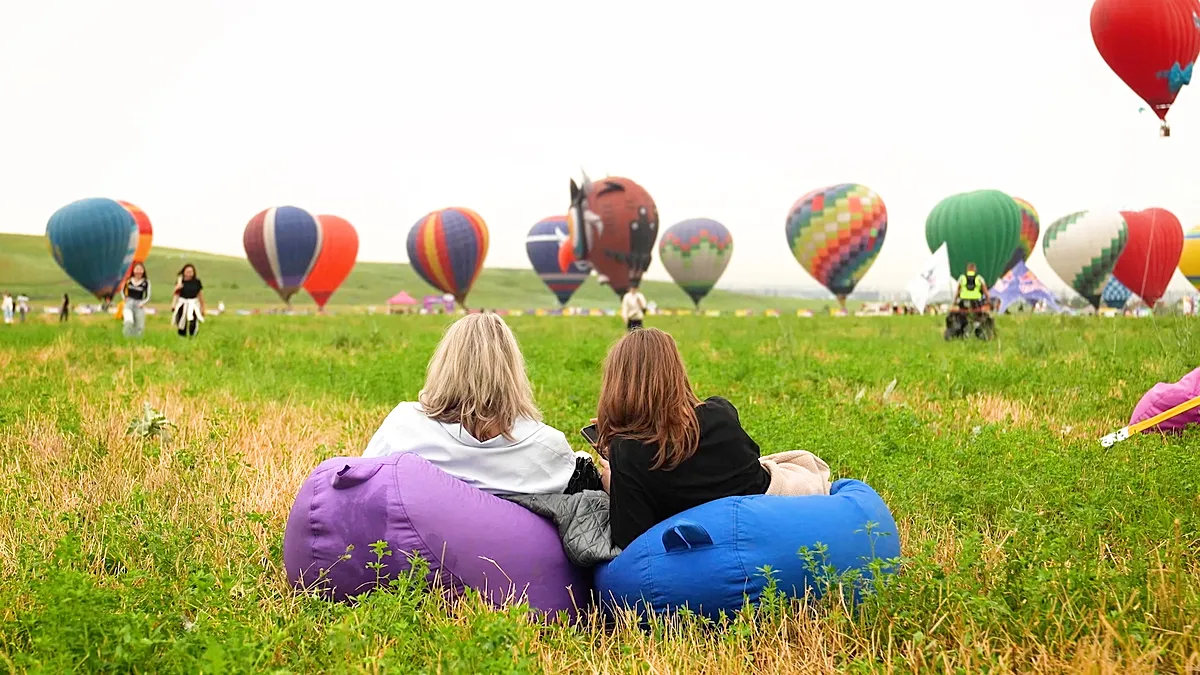
Hot air balloons fill Kazakhstan skies – Kazakhstan’s annual hot air balloon festival, a vibrant celebration of aerial artistry, has made a triumphant return after a two-year absence. Held in the Almaty region, the event showcased 30 brightly colored balloons, including a standout giant owl-shaped design, to captivate visitors and rekindle the spirit of adventure. Pilots from 12 nations gathered for the occasion, offering a global perspective to the local spectacle. The festival’s revival marks a significant milestone for the region, which had been impacted by severe weather conditions that forced its cancellation in 2024.
A Return to the Skies: Celebrating Tradition and Innovation
For the first time in two years, the skies above the Trans-Ili Alatau Mountains buzzed with activity as the festival’s signature balloons took flight. The foothills of the mountain range, known for their breathtaking landscapes, provided a stunning backdrop for the event. Each morning, the air shimmered with the gentle hum of engines and the sight of balloons ascending, painting the horizon in hues of gold, crimson, and azure. The festival’s return not only delighted aviation enthusiasts but also offered a rare opportunity for the public to witness the fusion of traditional craftsmanship and modern technology.
Among the 30 balloons, the owl-shaped design stood out as a whimsical addition to the lineup. Crafted by local artisans, this unique creation symbolized the region’s natural heritage and creative ingenuity. “The owl represents the wisdom and mystery of the Almaty region,” said a festival organizer. “It’s a tribute to the land’s history and its connection to the skies.” The balloons were not just visual marvels but also a testament to the event’s commitment to innovation. Some featured intricate carvings, while others incorporated sustainable materials, reflecting the growing emphasis on eco-friendly practices in the aviation industry.
More Than Just Balloons: A Festival of Experiences
While the balloons were the centerpiece, the festival offered a diverse array of activities to engage visitors of all ages. Tethered rides allowed attendees to experience the thrill of flight without leaving the ground, while passenger flights provided a panoramic view of the surrounding terrain. Families enjoyed hands-on workshops, where children learned the basics of balloon design and flight physics, and adults participated in guided hikes to the mountain foothills. Meanwhile, the sky was alive with additional excitement as motorized hang gliders performed daring demonstrations, drawing crowds to watch their acrobatic maneuvers.
Artists and performers also played a key role in the festival’s atmosphere. Live music sessions featured local bands and international acts, blending traditional Kazakh melodies with contemporary genres. A dedicated area for giant kites brought a different kind of aerial spectacle, with colorful designs soaring in the wind. “The festival is about more than just the balloons—it’s a celebration of creativity and community,” noted a visitor from Germany. “It’s a rare chance to see such a unique event and feel connected to the culture.” These activities underscored the festival’s broader mission to foster cultural exchange and promote local tourism.
The Resilience of the Event: Overcoming Challenges
The 2024 cancellation was a result of unprecedented flooding that swept through the Almaty region, disrupting plans and threatening the festival’s infrastructure. “We had to pause for safety,” explained a regional official. “But the passion for this event remained strong, and we were determined to bring it back.” The 2026 edition saw organizers implement measures to mitigate the risks, such as improved weather monitoring systems and reinforced landing zones. This resilience not only ensured the festival’s survival but also highlighted its importance to the local economy and tourism sector.
Rebuilding the event required collaboration between government agencies, private sponsors, and community volunteers. Local businesses contributed by offering discounted packages for attendees, while schools organized educational trips to showcase the festival’s value as a learning experience. The return of the festival also coincided with a renewed focus on adventure tourism, a growing industry in Kazakhstan. “This event is a gateway to experiencing the country’s natural beauty,” said a tourism board representative. “It’s about creating memorable moments that inspire people to explore further.”
Future Prospects: Building on Success
As the festival resumed, organizers expressed optimism about its future growth. The event’s revival is expected to attract larger crowds and more international participants, further solidifying its status as a regional highlight. Plans are already underway to introduce new features, such as a nighttime ballooning display and educational programs on ballooning history. “We want to make this festival a year-round attraction,” said a senior event manager. “By expanding our offerings, we hope to sustain interest and encourage more people to embrace this thrilling activity.”
The success of the 2026 edition also serves as a model for other similar events across the country. With its blend of entertainment, education, and cultural immersion, the festival has set a benchmark for combining tourism with local traditions. “The response has been overwhelming,” remarked a longtime attendee. “It’s not just about the balloons—it’s about the joy of being part of something bigger.” This sentiment reflects the event’s ability to unite people through shared experiences, reinforcing its role as a symbol of resilience and creativity.
Looking ahead, the festival aims to leverage its comeback to address environmental concerns. A portion of the event’s proceeds will be allocated to conservation efforts, supporting the preservation of the Almaty region’s natural ecosystems. This initiative aligns with the broader goals of sustainable tourism, ensuring that the festival’s legacy benefits both the community and the environment. “We’re not just celebrating the skies—we’re protecting them,” said a sustainability coordinator. “Every balloon represents a step toward eco-conscious exploration.”
Reflecting on the Impact: A Community Effort
For residents of the Almaty region, the festival’s return was more than a spectacle—it was a source of pride and economic boost. Local markets saw an increase in visitors, and small vendors showcased traditional crafts, from handwoven textiles to artisanal foods. “This event has revitalized our town,” said a local entrepreneur. “It brings in revenue and reminds us of our cultural roots.” The community’s involvement also extended to volunteer efforts, with citizens helping to manage logistics and support the event’s diverse activities.
As the festival concluded, organizers emphasized the importance of collaboration and adaptability in overcoming challenges. The two-year break provided an opportunity to refine the event’s structure, incorporate feedback from participants, and address logistical concerns. “We’ve learned a lot from the hiatus,” said a festival veteran. “It’s made us more prepared and passionate about what we do.” These insights are now being used to elevate the experience for future attendees, ensuring that the festival continues to thrive as a premier destination for adventure and culture.
The revival of Kazakhstan’s ballooning festival is a testament to the enduring appeal of such events. With its blend of excitement, education, and community engagement, the 2026 edition has set the stage for continued growth. As the skies once again fill with colorful balloons, the event serves as a reminder of the power of perseverance and the joy of shared experiences. For those who attended, it was more than a day of fun—it was a celebration of human ingenuity and the beauty of the natural world.
As the final balloons drifted into the horizon, the Almaty region stood as a beacon of hope and creativity. The festival’s return not only rekindled excitement among aviation lovers but also reinforced the region’s commitment to innovation and sustainability. With its unique blend of cultural heritage, modern technology, and community spirit, the event is poised to become a cornerstone of Kazakhstan’s tourism landscape. As organizers look to the future, they remain focused on delivering unforgettable experiences that highlight the country’s natural beauty and adventurous soul.