Switzerland: Geneva Shakes as Thousands Protest G7 Summit and Global Policies
Violence Erupts Amid Peaceful March
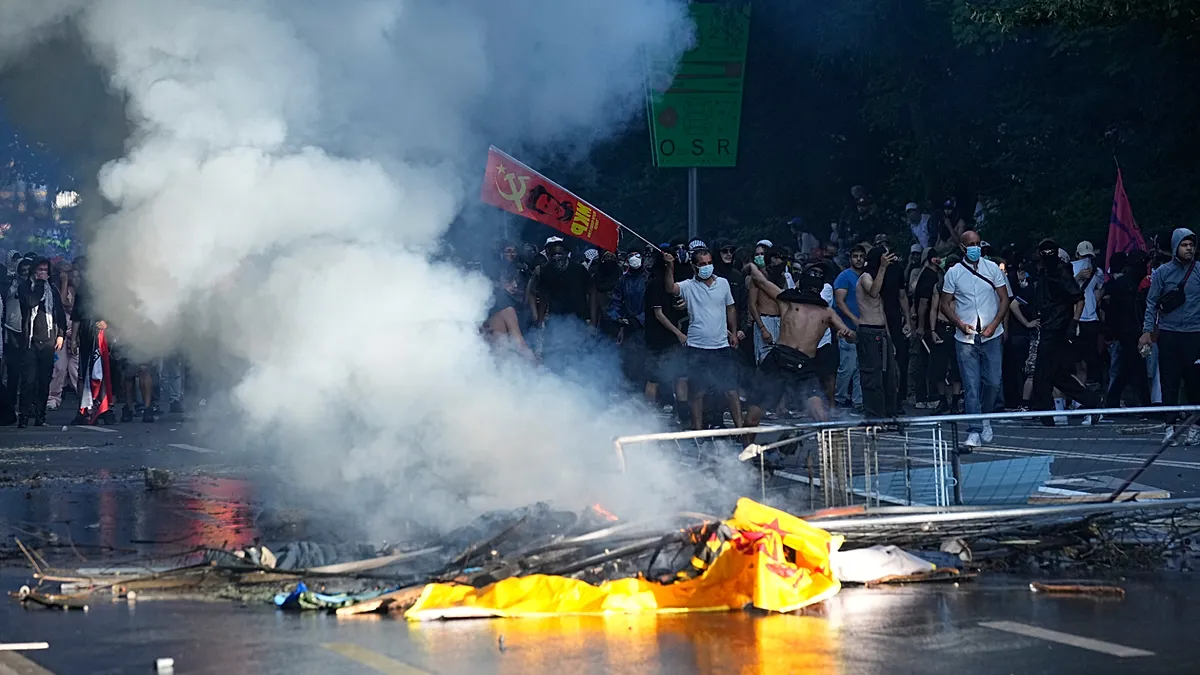
Switzerland – The afternoon of June 15 saw Geneva, Switzerland, descend into chaos as 20,000 demonstrators gathered to challenge the G7 summit and its implications for global governance. Clad in face masks and wielding makeshift weapons, the crowd marched through the city’s central districts, their initial peaceful procession quickly turning into a confrontation with security forces. The unrest, sparked by grievances over international policies, led to clashes that left a mark on the city’s streets and sparked concerns about the summit’s security arrangements.
As the protest unfolded, a surge of anger and frustration gripped the demonstrators, who targeted police with bottles, stones, and fireworks. The chaos escalated when officers deployed tear gas and water cannons to disperse the crowd, creating a tense standoff between protesters and authorities. Reports indicated that a vehicle caught fire near the protest route, while several buildings, including those housing international organizations, sustained damage. The scenes of disorder drew comparisons to past demonstrations in the city, though this particular event was described as one of the most intense in recent years.
“We’re not just here to voice our concerns—we’re demanding action,” said a protester holding a banner that read “Global Policies Fail the People.” The sentiment echoed across the crowd, with many decrying the economic and environmental policies of G7 nations.
The protesters, united by a shared critique of global institutions, represented a diverse coalition of environmental advocates, feminist groups, Palestinian rights supporters, and anti-globalization activists. Each group brought distinct priorities to the demonstration, highlighting the multifaceted nature of their collective demands. Environmental campaigners focused on climate change and corporate accountability, while feminist organizers called for gender equality in international trade agreements. Palestinian supporters highlighted the ongoing conflict in the Middle East, linking it to broader themes of economic disparity and political injustice. Anti-globalization activists, meanwhile, criticized the G7’s role in perpetuating inequality and environmental degradation.
Geneva police estimated that the rally drew one of the largest crowds in the country’s recent history, underscoring the growing public discontent with the G7’s influence. The march began peacefully under the sweltering summer heat, with participants carrying banners that criticized world leaders for their decisions on global issues. However, as the protest progressed, the mood shifted, with some demonstrators expressing frustration over the lack of tangible reforms and the perceived dominance of corporate interests in shaping international policies.
Summit Security and Political Tensions
The disturbances occurred just days before the G7 summit, which was set to open in Évian, France, on June 15. Swiss and French authorities had mobilized thousands of security personnel to ensure the event’s smooth operation, a decision that drew criticism from some protesters who viewed it as a sign of growing authoritarianism. Despite the heightened security, the protest in Geneva highlighted the potential for public dissent to disrupt even the most carefully planned international gatherings.
Organizers of the demonstration had warned of the possibility of violence, citing the tensions that had been building over the years. The G7 summit, which brings together leaders from Germany, France, the United Kingdom, Italy, Japan, Canada, and the United States, is expected to address critical issues such as the war in Ukraine, regional conflicts in the Middle East, and the global economic crisis. The protest in Geneva served as a reminder that these policies are not without controversy, with critics arguing that they prioritize the interests of wealthier nations over those of developing countries.
Among the key issues on the agenda, the war in Ukraine remains a focal point. Leaders are anticipated to discuss the ongoing humanitarian crisis, the impact of sanctions on global markets, and the role of international alliances in maintaining stability. Meanwhile, the Middle East tensions, particularly in Gaza and Lebanon, are likely to be scrutinized in the context of broader geopolitical strategies. Economic challenges, including inflation and supply chain disruptions, will also be on the table, with some protesters accusing the G7 of failing to address the root causes of these crises.
As the demonstrations in Geneva continued, the focus remained on the summit’s ability to foster meaningful dialogue. The scale of the protest, combined with its diverse coalition, suggested that the G7’s policies are a flashpoint for global discontent. Analysts noted that the event reflected a broader movement against neoliberal economic models and the concentration of power in a few major nations. The clash between protesters and authorities in Geneva became a symbol of the growing divide between the global elite and the populations they govern.
Geneva’s role as a hub for international diplomacy was put to the test during the protests. The city, known for its neutrality and host to the United Nations, faced a rare moment of upheaval as demonstrators marched past the UN headquarters, which had become a central symbol of their grievances. The UN’s involvement in global governance and its perceived alignment with G7 interests were singled out for criticism, with some protesters arguing that the institution should be more accountable to the people it serves.
Amid the chaos, efforts to de-escalate the situation were underway. Police used tear gas to create barriers between protesters and the summit venue, while negotiators worked to convince the crowd to disperse. Despite these measures, the demonstrations persisted, with groups demanding a ceasefire in the Middle East and a commitment to social reforms. The fire that broke out near the protest route added to the urgency of the situation, forcing authorities to prioritize emergency response alongside crowd control.
As the sun set over Geneva, the streets were still filled with the echoes of protest. The 20,000 participants, though diverse in their demands, shared a common frustration with the status quo. Their actions underscored the belief that global policies must be reimagined to better reflect the needs of all nations. While the immediate aftermath of the clashes brought questions about the summit’s security, it also highlighted the power of collective action in shaping international discourse.
The unrest in Geneva serves as a reminder that even in a city synonymous with diplomacy, the voices of the public cannot be ignored. As the G7 summit approaches, the demonstration has sparked a broader conversation about the balance between global cooperation and local accountability. Whether the summit will address these concerns remains to be seen, but the events in Geneva have already left an indelible mark on the proceedings. The clash between protesters and authorities is a testament to the enduring tensions that define the global political landscape.